Prism
Use Prism to review pull requests, investigate findings, understand coverage and scores, and understand advisory GitHub checks.
View as MarkdownPrism reviews a pull request against the repository around it, then posts a verdict, a score out of 5, and findings with file and line references. Use it as a second reviewer for human- or agent-written changes. Prism comments and reports; a person approves and merges.
#Choose Prism for a code review before merging
Prism is useful when you want to catch incorrect behavior, security problems, or violations of your team's review rules before a change lands. It reads beyond the changed lines, so it can assess a change in the context of the repository.
For proof that commands still pass, use Estelle CI. For evidence that a running user flow still works, use Twice. These checks answer different questions and can run on the same pull request.
#Get and handle a review
Connect the repository
Install the Estelle GitHub App and grant it access to the repositories you want reviewed. See GitHub.
Choose when reviews run
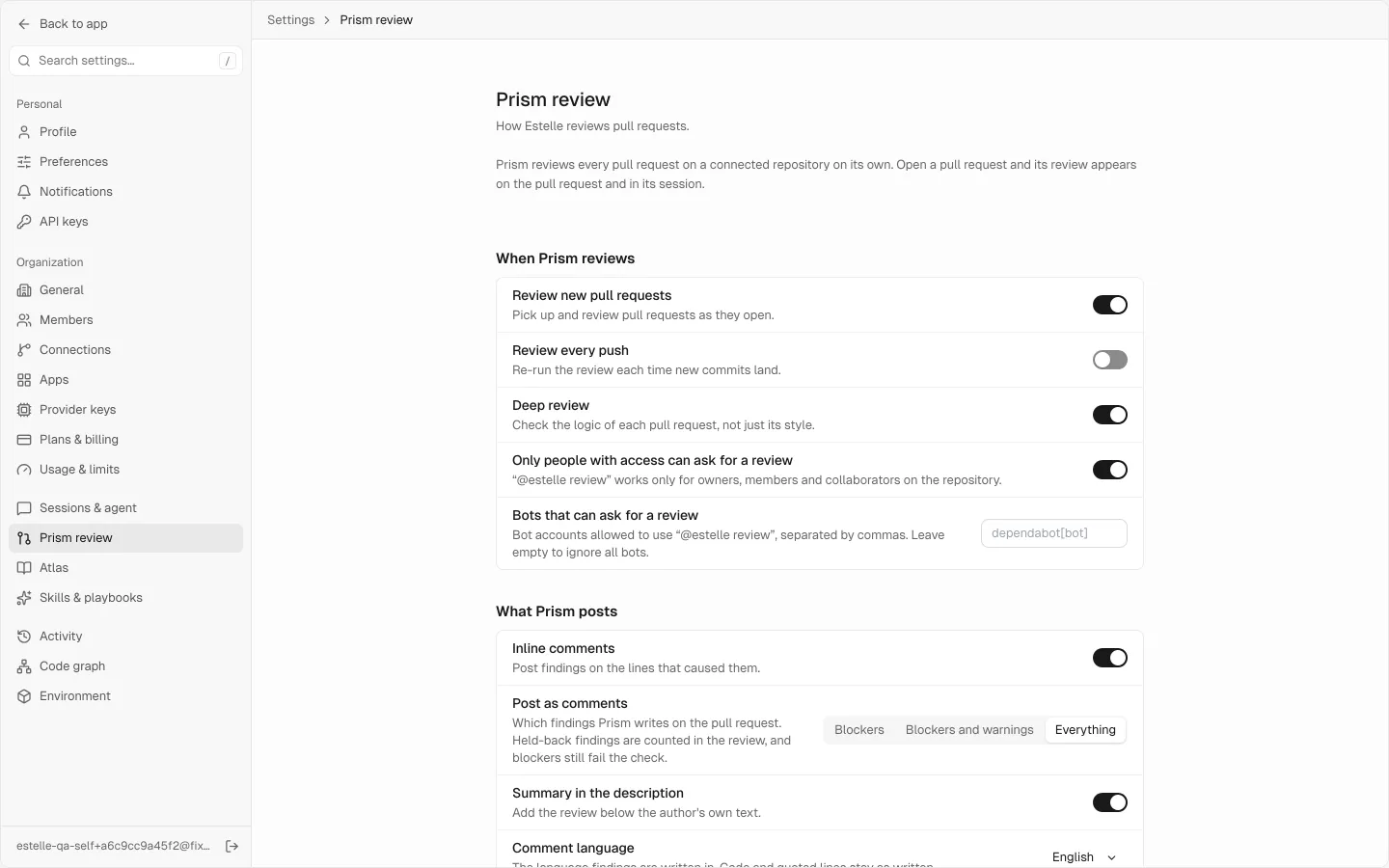
Open Settings → Prism review → Review. Enable Review new pull requests for automatic reviews. Use Automatic review for to limit them to selected repositories or authors. Review every push requests another review when new commits arrive.
You can always request a review manually by commenting
/estelle reviewon the pull request, subject to the access settings below.Read the verdict before the findings
Start with the headline, the score basis, and the coverage note. They distinguish a problem in the change from a review that could not examine everything.
Investigate each finding
Open the inline comment at its file and line. Read what Prism observed, why it matters, and any suggested change. Check the claim against the surrounding code and your own tests before applying a fix.
Resolve and re-review
Push your correction, then request another pass if Review every push is off. A new review is evidence about the new head commit; it does not make an earlier finding's discussion disappear.
#Understand the verdict and score
The headline tells you what to do next:
| Headline | What it means |
|---|---|
| Not safe to merge | Prism reported at least one blocking finding about the change. Investigate those findings before merging. |
| No blockers | There are no blocking findings, but there are warnings to read. |
| Safe to merge: nothing found | Prism found nothing in the change it examined. This is not a substitute for human review or tests. |
| Nothing found: a human should still review this critical change | Prism found nothing, but the change touches an area that still needs careful human review. |
| No blockers found: partly reviewed | No blocker was found in the part reviewed, but some of the change was not examined. |
| Estelle couldn't review this yet | Estelle could not complete the review. The message is not a finding against your code. |
The score is a summary of what was examined and what was found, not a probability that the change is safe. Read it with its denominator, such as the number of changed files examined, and its Why explanation. A lower score can reflect findings, incomplete coverage, or both; the number alone does not tell you which.
A partial review, an unexamined file, or a neutral check is never proof that the rest of the change is clean. A High strictness policy can promote a warning or error to a blocker; when the report attributes a blocker to that policy, distinguish its original finding from the policy decision. This changes neither the evidence nor the need to investigate it.
#Read a finding
A finding can include its priority, location, explanation, evidence, and a suggested edit. Its location is the starting point for your investigation, not proof by itself. When Prism offers a GitHub suggestion, review the exact replacement before committing it.
Findings that cannot be attached to a changed line appear in the main review with a code link where one is available. The review also says when findings were held back by your posting settings or a display limit; those limits do not remove findings from the verdict.
Use your own reproduction or test to settle a disputed finding. If it is wrong, reply with the evidence so your team has the reasoning beside the review.
#Understand the two GitHub results
- Estelle Prism is advisory. A completed review with nothing found can finish as success; findings or incomplete coverage finish as neutral. A neutral check is not a clean review.
- estelle/merge-gate is also advisory. Its status stays green and its description names findings or UNVERIFIED coverage. A green status alone does not mean the change was fully checked.
Neither result blocks merging. Requiring an advisory status in branch protection does not turn its findings into a failed test gate. Use the relevant Estelle CI job checks when merging must depend on tests passing, and review Prism's evidence yourself.
#Configure what Prism reviews and posts
Open Settings → Prism review → Review. Team admins can change these settings; other members can read them.
| Setting group | Use it to |
|---|---|
| What Prism posts | Include bugs, security findings, flags, and notes. Hidden kinds still count toward the review's score and counts. |
| Where it posts | Control inline findings, the pull-request summary and link, the Estelle Prism check, comment language, and which finding levels become comments. |
| Review effort | Choose the review effort and whether deep review is on. Higher effort takes more review work; Lenient omits warnings. |
| When Prism reviews | Control reviews on open and on subsequent pushes. |
| Automatic review for | Restrict automatic reviews by repository, organization wildcard, or author. Manual /estelle review requests still work. |
| Who can ask for a review | Require repository access and name any bot accounts allowed to request reviews. Unlisted bots are ignored when the list is empty. |
| Context | Name team rule files and add review rules in plain language. Rule files are read from the base branch, so a pull request cannot change the rules used to review itself. A repository's own rules belong in .estelle/review.md. |
| Spend limit | Cap the percentage of your plan that one review may use. Zero means no cap. A review stopped by the cap says so and is not a complete review. |
The Post as comments choices are Blockers, Blockers and warnings, and Everything. They change what is posted, not what was found or the advisory nature of the status.
#Add a reviewer for your own standard
Use Settings → Prism review → Reviewers → New reviewer when the same project-specific mistake keeps mattering to your team.
- Give the reviewer a name and, optionally, a description.
- Choose Severe, Moderate, or Info for its findings.
- Write instructions that say both what to look for and what to ignore.
- Scope it to
owner/nameorowner/*entries, or leave repositories empty for all connected repositories. - Choose Save as draft or Create and turn on.
Enabled reviewers run beside Prism's standard review on later pull requests. The settings page shows the team's reviewer limit and how many reviewers can run on one pull request. You can edit, disable, archive, or restore a reviewer; changes apply to later reviews.
#Retry or troubleshoot a review
If Estelle could not review, read the stated reason first. An unavailable service, an incomplete repository index, or an unreadable part of the diff calls for a retry or setup correction, not a code fix.
Comment /estelle review to retry, or push a new commit. When the message says the repository index is being updated, Estelle can retry after that update, at most twice for the same commit. Start a comment line with /estelle review; /estelle verify requests the additional budget-capped proof stage. Commands inside code or quotations are ignored. The retired GitHub handle mention does not request a review.
Reviews use Estelle Credits. Reviewing every push uses more than reviewing once per pull request. See Plans and credits.