Estelle CI
Use Estelle CI to configure workflows, run builds and tests in Silos, read step evidence and logs, and require meaningful GitHub checks.
View as MarkdownEstelle CI runs build and test commands from a workflow in your repository. Each run executes in an isolated Silo and reports step results, durations, and logs in the dashboard, with GitHub checks on the commit. Its workflow format is a deliberately supported subset of GitHub Actions; unsupported configuration is refused by file, key, and line rather than silently skipped.
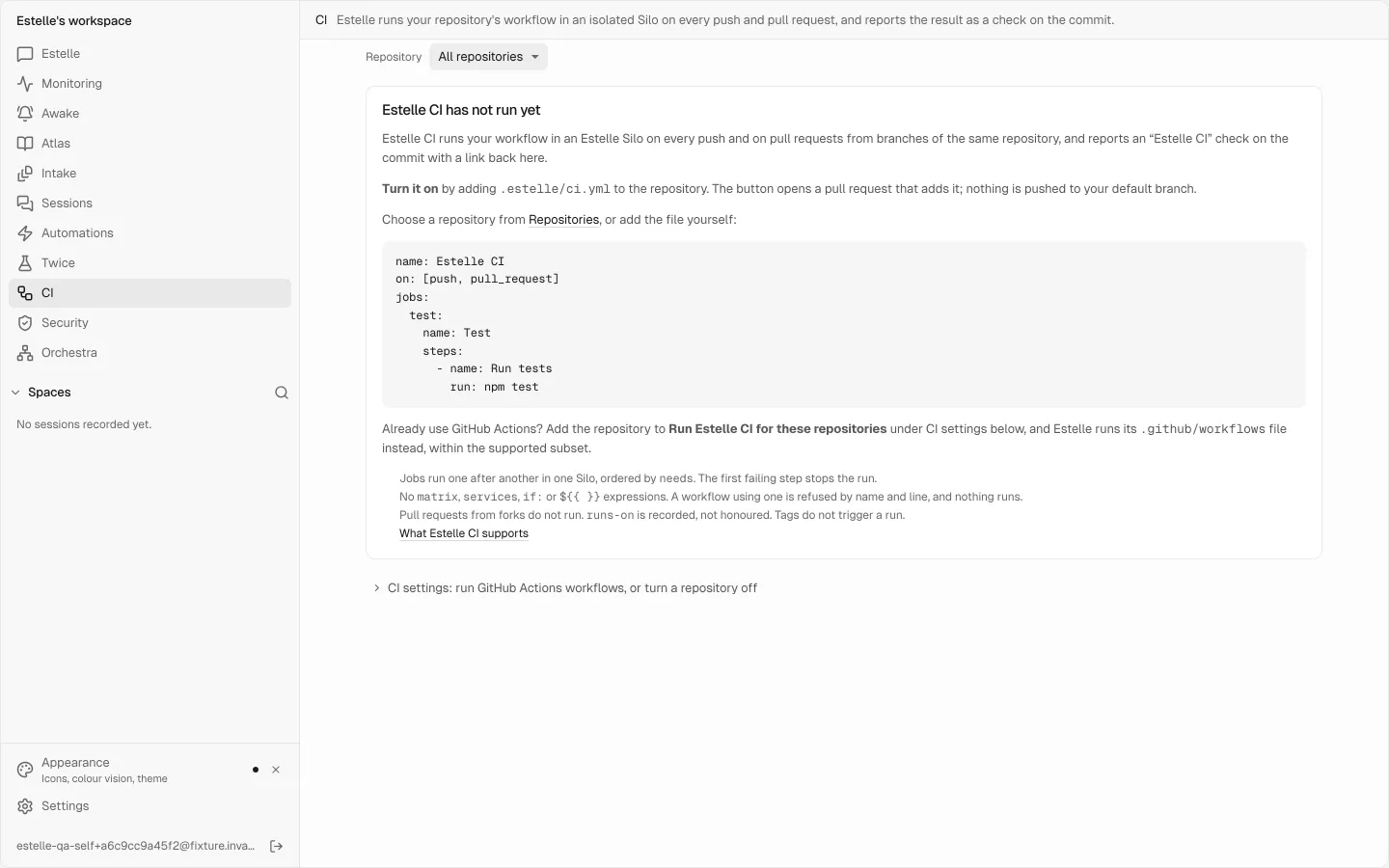
#When to use Estelle CI
Use Estelle CI for repeatable build and test evidence on pushes and same-repository pull requests, without maintaining runners. It can install Node or Python toolchains and provide one PostgreSQL service per job.
Estelle CI needs the Estelle GitHub App on the repository. It complements Prism, which reviews code, and Twice, which tests user journeys in a browser.
#Turn CI on with a pull request
Choose the repository and test command
Open CI, select a repository, and optionally enter a command such as
npm test. Choose Turn on Estelle CI. You can start the same flow from the repository's row in Repositories.Review the setup pull request
Estelle opens or reuses a pull request from
estelle/ci/enablethat adds.estelle/ci.yml. It does not push the file to your default branch. Review the commands before merging.Inspect the first run
CI runs on the setup pull request. Open each check's Details link to inspect its commit, workflow, steps, and output. Fix the workflow if its commands do not install and test the app correctly.
Merge the workflow
Merge the setup pull request when its checks and file are correct. Later commits containing
.estelle/ci.ymlrun CI on pushes and matching pull requests.
You can also commit .estelle/ci.yml directly. That file takes precedence over workflow auto-detection and .github/workflows files.
#Write a workflow
This example runs lint before tests and gives the test job a PostgreSQL database:
name: tests
on:
  push:
    branches: [main, "release/**"]
  pull_request:
env:
  NODE_ENV: test
jobs:
  lint:
    name: Lint
    steps:
      - uses: actions/checkout@v4
      - uses: actions/setup-node@v4
        with:
          node-version: "20"
      - run: npm ci
      - run: npm run lint
  test:
    name: Test
    needs: lint
    timeout-minutes: 20
    services:
      postgres:
        image: postgres:16
        env:
          POSTGRES_USER: app
          POSTGRES_PASSWORD: app
          POSTGRES_DB: app_test
    steps:
      - uses: actions/checkout@v4
      - uses: actions/setup-node@v4
        with:
          node-version: "20"
      - run: npm ci
      - name: Unit and integration tests
        env:
          DATABASE_URL: postgres://app:app@127.0.0.1:5432/app_test
        run: npm test
Jobs linked by needs run serially in one Silo and publish one check. Independent job groups run in parallel, each in its own Silo with its own check. The first failing step stops its group; later steps are marked not run.
#Supported workflow syntax
| Level | Supported keys |
|---|---|
| Top level | name, on, env, jobs, permissions |
on | push, pull_request, and workflow_dispatch without inputs; push and pull_request accept branches |
| Job | name, needs, env, runs-on, timeout-minutes from 1 to 30, services, steps |
| PostgreSQL service | One per job: image, env, ports, and options containing only --health-* flags |
| Step | Exactly one of run or uses, plus name, env, working-directory, timeout-minutes from 1 to 15, and with for a supported action |
Branch patterns use * within a path segment and ** across segments. For a pull request, a branch filter applies to its base branch.
#Actions and toolchains
Pin actions as owner/name@ref. These are supported:
actions/checkout, accepted without another checkout step because the run already checks out the commit;actions/setup-nodewithnode-version18, 20, 22, or 24;actions/setup-pythonwithpython-versionfrom 3.8 to 3.14.
Use a plain version such as 20, 3.x, or 3.12. Ranges and aliases such as lts/* are refused. The run verifies the installed version before continuing.
#PostgreSQL
Use postgres:<major> or pgvector/pgvector:<x.y.z>-pg<major> with PostgreSQL majors 13 to 18. POSTGRES_PASSWORD is required; POSTGRES_USER and POSTGRES_DB are optional. The service listens on 127.0.0.1:5432 inside the job's Silo. Other service types are refused.
#Refused configuration
Estelle CI refuses ${{ }} expressions, if, strategy and matrix, container, concurrency, schedule, reusable workflows, unsupported actions, and keys outside the tables above. Use a scheduled Automation instead of schedule.
permissions is accepted, but steps receive no GitHub token. runs-on is recorded and does not select a different machine image.
Each step runs in bash with -eo pipefail. Steps receive CI, GITHUB_WORKSPACE, RUNNER_TEMP, GITHUB_SHA, GITHUB_REPOSITORY, and ESTELLE_CI. They do not receive GITHUB_ACTIONS, GITHUB_EVENT_NAME, GITHUB_REF_NAME, GITHUB_OUTPUT, or GITHUB_ENV.
#Use an existing GitHub Actions workflow
A repository with only .github/workflows files does not use them until you opt in. On the CI page, open CI settings: run GitHub Actions workflows, or turn a repository off and add the repository to Run Estelle CI for these repositories.
Exactly one workflow must match the event, and it must stay within the supported subset. If the commit also contains .estelle/ci.yml, that file wins. Add a repository to Never run Estelle CI for these repositories to turn CI off even when .estelle/ci.yml exists.
#Run tests detected from your repository
For a repository with neither .estelle/ci.yml nor .github/workflows, Settings → Automatic → Run CI from the tests you already have lets Estelle derive a workflow from project manifests on pushes and pull requests.
It recognizes test and build commands in package.json, Python project and pytest configuration, go.mod, Cargo.toml, and a Makefile with a test target. Declared Node, Cargo, and uv workspaces can be detected per package. Detection uses the commands the manifests actually declare; it does not invent a test command for an unrecognized project.
Add .estelle/ci.yml when you need explicit setup, multiple jobs, a database, or commands different from the detected ones. That explicit file always takes precedence.
#Trigger and read a run
| Event | CI behavior |
|---|---|
| Push to a branch | Runs when the workflow's trigger and branch filters match. |
| Pull request opened, updated, or reopened | Runs for pull requests from branches of the same repository. |
| Tag push | Does not run. |
| Pull request from a fork | Does not run. |
| Run started through the API | Runs all jobs in one Silo and reports an Estelle CI check. |
The dashboard lists each job in dependency order. While a run is active, you can read its live terminal; after it finishes, each step retains its state, duration, and available log. The live view can skip lines from very verbose output, and retained logs can be bounded; the page says when output was not retained. Step results and the presence of a truncation notice are different kinds of evidence.
Use the run's Check on GitHub link to return to the commit. Other job groups on that commit are linked separately so one group's result is never presented as another group's pass.
#Interpret checks and test evidence
| Result | What it means |
|---|---|
| Queued or Waiting for a slot | No test result yet. The run is waiting for capacity. |
| Passed / All steps passed | Every required step in this run produced a successful result. |
| Failed / A step failed | A step exited unsuccessfully. Later steps did not run; inspect the first failing step. |
| Incomplete | The runner's outcome and step evidence do not support a pass. Read the missing-step explanation. |
| Timed out | The run exceeded its time budget. This is not a test pass. |
| CI refused this job definition | The workflow is outside the supported subset. Nothing was verified by running it. |
| CI did not run: not queued | Capacity or another preflight refusal prevented the run. Nothing was verified about the commit. |
| Superseded | A newer commit replaced this run. Judge the newer commit's own checks. |
Every commit for which CI is enabled also receives Estelle CI preflight. Preflight answers whether the workflow was accepted and its runs were queued; it does not answer whether tests passed.
| Preflight result | Meaning |
|---|---|
| Workflow accepted: every run is queued | The workflow is valid and its job checks were queued. Read those job checks for test results. |
| Not every run could be queued | Some work was not started because the account was at its run limit. The summary names the missing runs. |
| CI refused this commit's workflow: nothing ran | The file is invalid, unsupported, or required by repository settings but absent. |
| CI could not decide: nothing was verified | Estelle could not read the commit or resolve the account, so no conclusion is available. |
For branch protection, require Estelle CI preflight when you want a stable check for workflow acceptance, and require the relevant job checks when merging must depend on tests passing. Preflight alone is not a test gate.
#Limits
| Limit | Value |
|---|---|
| Jobs running at once per account | 4 |
| Runs waiting in the queue per account | 12 |
| Jobs per workflow | 20 |
| Steps per job | 50 |
| Time per step | 15 minutes |
| Time per job | 30 minutes |
| Workflow file size | 64 KiB |
| Characters per command | 8,000 |
There is no matrix, custom container, expression evaluation, caching, artifacts, or user-defined concurrency block. When a newer commit supersedes an older run, read the newer commit's checks instead. Estelle CI is not a drop-in replacement for every GitHub Actions workflow.
Silo time is charged in Estelle Credits from startup until shutdown. An account without credits is refused before the run starts. See Plans and credits.